Today i needed a solution to hide the new button in a view. If found an elegant solution on Codeplex, the "Toolbar Manager"
Toolbar ManagerThis Feature allows you to selectively show and hide menu items on the standard list/library toolbar. The feature adds a new web part to the gallery that you can place on any list/library view page. Once placed on the page, you can use the properties of the web part to show or hide menu items. This is the perfect solution for hiding a single menu item such as “Export to Spreadsheet” to prevent users from taking that action.
A complete article on this feature can be found here: http://scothillier.spaces.live.com/blog/cns!8F5DEA8AEA9E6FBB!280.entry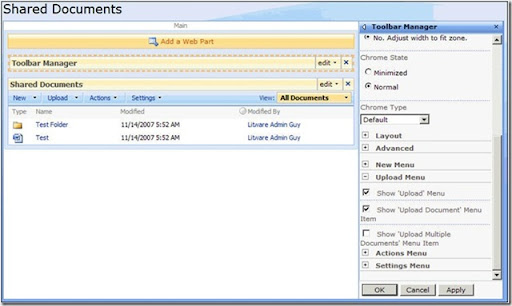
This feature belongs to the "SharePoint 2007 Features" on Codeplex http://www.codeplex.com/features which contains many other interesting features!
Have a look at it!
Showing posts with label SharePoint. Show all posts
Showing posts with label SharePoint. Show all posts
Friday, 11 July 2008
How to hide buttons in SharePoint - SharePoint Toolbar Manager

Subscribe to:
Posts (Atom)
