Monday, 21 July 2008

How to manage multiple Remote Desktop Connections

I my job as SharePoint Consultant I work on many different customer locations with many different SharePoint servers and thus many remote server connections. 

I found a good tool to manage all my Remote Desktop connections for each customer, something better than the standard "remote desktop connection" in Windows XP or Vista.

and ... it's a free tool ...

visionapp Remote Desktop (vRD 1.5)
You can download it here: http://www.visionapp.com/141.0.html?

There is also a more advanced version available
(read: you have to pay for it ...) visionapp Remote Desktop 2008

visionapp

visionapp Remote Desktop 2008 (vRD 2008) is a powerful tool for managing and accessing multiple Windows servers and desktops via RDP (Remote Desktop Protocol).

There is a nice comparison sheet between the free and the pro version:
http://software.visionapp.com/1934.0.html?&ftu=31c8cdd49d

Previously i used Royal TS
http://code4ward.net/cs2/files/folders/rts1/entry1247.aspx

but Visionapp has one big difference that you can define your user accounts centrally so if your password changes, you can update it once and all your Remote Desktop connections are up to date.  With Royal TS i need to update them one by one.

Monday, 14 July 2008

How to install Forms Based Authentication (FBA) in SharePoint 2007

Last week i needed to install Forms Based Authentication (FBA) in SharePoint 2007.

This article was a good help for me:

Configuring Forms Authentication in SharePoint 2007
http://www.simple-talk.com/dotnet/windows-forms/configuring-forms-authentication-in-sharepoint-2007/

Once configured you need a good solution to manage the users and roles for your site and if possible IN SharePoint and not in another application.  I found a cool project on Codeplex that had these requirements!

Forms Base Authentication Tools and Utils for SharePoint 2007
http://www.codeplex.com/fba

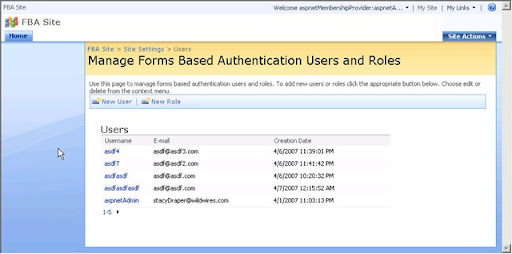
FBAListOfUsers

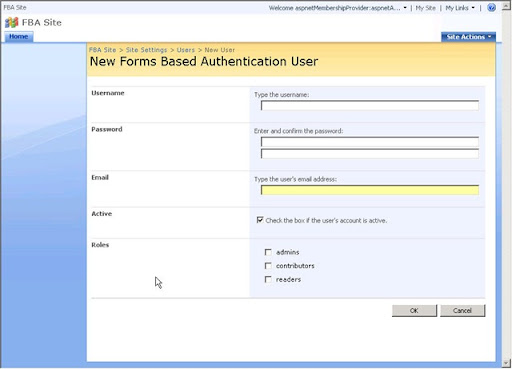
FBANewUser 
Click here if you want to see more screenshots

Why using MS Office 2007 with SharePoint 2007?

If you are using SharePoint 2007, why should you upgrade from MS Office 2003 to MS Office 2007?  Here is a list of the additional end-user benefits realized when interfacing with SharePoint 2007:

http://blogs.msdn.com/brittog/archive/2007/02/16/wht-you-get-with-office-2007.aspx

Another good article on this topic: MS Office Integration with SharePoint [Fair, Good, Better and Best]
http://www.sharepointbuzz.com/2007/04/18/ms-office-integration-with-sharepoint-fair-good-better-and-best/

Friday, 11 July 2008

How to hide buttons in SharePoint - SharePoint Toolbar Manager

Today i needed a solution to hide the new button in a view. If found an elegant solution on Codeplex, the "Toolbar Manager"

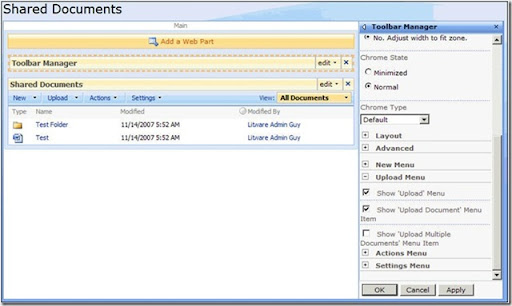
Toolbar ManagerThis Feature allows you to selectively show and hide menu items on the standard list/library toolbar. The feature adds a new web part to the gallery that you can place on any list/library view page. Once placed on the page, you can use the properties of the web part to show or hide menu items. This is the perfect solution for hiding a single menu item such as “Export to Spreadsheet” to prevent users from taking that action.

A complete article on this feature can be found here: http://scothillier.spaces.live.com/blog/cns!8F5DEA8AEA9E6FBB!280.entry

ToolbarManager
This feature belongs to the "SharePoint 2007 Features" on Codeplex http://www.codeplex.com/features which contains many other interesting features!

Have a look at it!

Thursday, 5 June 2008

MS Search Server 2008 Part 4 - What is Federated Search?

This is the 5th post of a serie on MS Search Server 2008:

MS Search Server 2008 Part 1 - What is MSS 2008?
MS Search Server 2008 Part 2 - Versions
MS Search Server 2008 Part 3 - Product Improvements
MS Search Server 2008 Part 4 - MS Search Server 2008 compared to MS Offiche SharePoint Server 2007

What?

The federated search is a new search functionality that comes with the release of MS Search Server 2008. The new webparts can display search results from other non-sharepoint sources like Yahoo, Live.com, Technet, wikipedia, Flickr, ...

They can also be used to display search results form a custom database or a 3rd party application like Symantec Enterprise Vault, Coveo, EMC, ... And last but not least federated search can be used to search in remote SharePoint Farms (!!!)

Webparts

  • Federated Results Webpart: connects to a single federated location and displays the top X results returned from the location.

  • Top Federated Results Webpart: connects to multiple federated locations and displays the top X results from the first location to return a result in the order of the configured locations

How does it work?

  • The server will send a query to the other search engine or application as a parameterized URL, for example : http://search.live.com/results.aspx?q={searchTerms}

  • The external search engine returns and renders the result in a predefined XML format
  • The federated results webpart renders the xml on the screen based on the XSLT formatting rules.

All these operations are defined in one XML file, the .FLD file. FLD stands for Federated Location Definition.

This file describes the following:

  • how and when the queries will be federated to the location
  • the formatting of the results in XSLT
  • the authentication settings

Here you can download some sample connectors files + a list of the MS Partners who already have a solution for the Federated Search:
http://www.microsoft.com/enterprisesearch/connectors/federated.aspx

Some Screenshots

Sample of a federated results webpart showing results from MS Live search:


Sample of a federated results webpart showing results from You Tube:


Management of the Federated Locations in the SharePoint administration website:


SAP .NET Connector 2.0 and SharePoint 2007 ?

Question?
How do we upgrade webparts from SharePoint 2003 that are using the SAP .NET Connector 2.0 to SharePoint 2007.

Answer ...
First of all you need to upgrade your webpart to framework 2.0 using the SharePoint 2007 DLLs. Problem is here that there is no SAP .NET Connector for framework 2.0. (SAP .NET Connetor 2.0 is still based on Framework 1.1).

Here you can find an article describing how to use the SAP Connector in Visual Studio 2005. The solution also should work with Visual Studio 2008

https://www.sdn.sap.com/irj/sdn/go/portal/prtroot/docs/library/uuid/92333e6b-0b01-0010-9cbf-fecd62d6c895

Currently, SAP Connector for .NET is not supported in Microsoft Visual Studio 2005. We suggest a workaround that enables easy design-time connectivity to SAP backend systems in Visual Studio 2005 by creating the .NET Connector proxies in Visual Studio 2003 and porting them to Visual Studio 2005.

Important to know is that this component is discontinued, so they will not provide newer versions of the SAP .NET Connector. You now should use the webservices solution with SAP Netweaver.

Some extra links:
http://forums.asp.net/p/979309/1933629.aspx
http://blogs.clearscreen.com/enadan/archive/2006/08/25/3419.aspx

Thursday, 15 May 2008

Overview of SharePoint 2007 limitations

This is an article on Technet I want to share with you! I use it very often to make technical designs for clients:

Plan for software boundaries (Office SharePoint Server)http://technet.microsoft.com/en-us/library/cc262787.aspx

This article provides information to help you understand the tested performance and capacity limits of Microsoft Office SharePoint Server 2007, provides information about the test environment and test results, and offers guidelines for acceptable performance. Use the information in this article to determine whether your planned deployment falls within acceptable performance and capacity limits.